
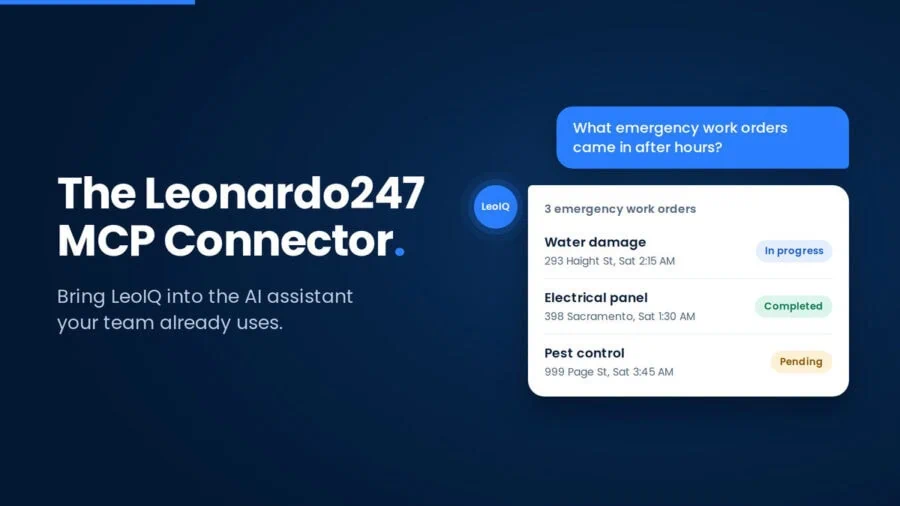
The Leonardo247 MCP Connector is an integration that lets authorized users access LeoIQ and interact with Leonardo247 operational data from ChatGPT, Claude, and other MCP-compatible AI assistants.
Built on the Model Context Protocol (MCP), the connector allows multifamily owners, regional managers, on-site maintenance staff, and property teams to ask questions and take permitted actions in plain English. Users can work with tasks, inspections, incidents, work orders, compliance records, and other operational data without opening a separate dashboard.
What is the Leonardo247 MCP Connector?
The Leonardo247 MCP Connector connects Leonardo247 and LeoIQ to compatible AI assistants using the Model Context Protocol (MCP). It allows authorized users to ask questions about Leonardo247 operational data and perform supported actions directly from the AI assistant they already use.
Instead of logging into another interface to find information or complete a workflow, a user can ask a question or give an instruction in natural language. The connector passes that request to Leonardo247 while respecting the user’s existing permissions and access controls.
That means tasks, inspections, incidents, work orders, compliance records, and other operational information can be accessed conversationally, based on what each user is authorized to see and do.
The Leonardo247 MCP Connector is planned for broader release in Q4 2026. Customers can request early access to test the connector in live portfolios ahead of broader availability.
What does MCP stand for?
MCP stands for Model Context Protocol. It’s an open standard that gives AI assistants a common, secure way to connect with the tools, systems, and data that teams already rely on, so they don’t need a custom integration for every platform.
In multifamily maintenance operations, that matters. Critical information is often spread across work orders, preventive maintenance schedules, inspection records, make-ready tasks, and compliance documentation. Maintenance supervisors, regional managers, and service teams spend valuable time pulling that information together before they can act on it.
For Leonardo247, MCP is the bridge between an authorized user’s AI assistant and the operational information and supported actions available in Leonardo247. Instead of logging in and navigating multiple screens, a user could ask their AI assistant a plain-language question, such as which properties have overdue preventive maintenance tasks or what’s outstanding on this week’s inspections, and get an answer grounded in their actual Leonardo247 data. Access stays tied to each user’s permissions, so the assistant only sees and does what that person is already authorized to see and do.
Why does MCP matter for multifamily property management?
MCP can make operational software accessible from the AI assistants multifamily teams already use.
Instead of requiring property teams to learn another AI interface, the Leonardo247 MCP Connector brings LeoIQ and supported Leonardo247 workflows into compatible AI assistants.
Why does the Leonardo247 MCP Connector matter for owners and operators?
The Leonardo247 MCP Connector closes the gap between multifamily teams and their operational data, turning everyday questions into simple conversations. Authorized users, from owners and regional managers to on-site maintenance teams, can use natural-language prompts to look up an incident, track down an outstanding task, review inspection results, or start a supported workflow without clicking through multiple screens or reports. Because every request respects existing Leonardo247 permissions, teams gain speed without giving up control, and that shift shows up in day-to-day operations in a few concrete ways.
There are three practical benefits.
1. Teams can work from AI tools they already use
The connector brings LeoIQ into compatible AI assistants an organization may already have in its technology stack.
Instead of introducing another standalone AI interface, the MCP Connector lets authorized users interact with Leonardo247 from a supported assistant.
A regional manager could ask about outstanding tasks. An owner could ask about operational activity across authorized properties. A property team member could follow up on an incident or inspection.
The user’s Leonardo247 permissions determine what information and actions are available.
2. Multi-step workflows can start with one prompt
The Leonardo247 MCP Connector can turn supported workflows that involve multiple steps into a conversational request.
For example, standing up a new property can involve creating the property record, assigning it to a portfolio, configuring access, and generating recurring task templates.
Through the connector, that workflow can begin with an instruction such as:
“/leo add this new property to the Geary portfolio.”
In the current demo workflow, Leonardo247 can then create the property, update the portfolio, configure the appropriate access, and generate the relevant task templates.
Task management can work conversationally as well.
A user might ask:
“What’s the status of the incident report I submitted last week?”
LeoIQ can retrieve the relevant record and return its current status. Where supported, the user can then take a follow-up action from the same conversation.
The goal is not simply to answer questions. It is to reduce the number of steps between knowing what needs to happen and getting it done.
3. Answers are grounded in Leonardo247’s operational record
The Leonardo247 MCP Connector connects the AI assistant to Leonardo247 rather than creating a separate operational system of record.
Responses are grounded in the Leonardo247 information the authenticated user is permitted to access. Supported actions are also governed by the user’s Leonardo247 permissions.
This means the AI interface can change without changing the underlying operational record.
As Leonardo247 CEO Ken McDonald said on the NAA Apartmentcast, “AI alone is not a strategy. Your operational playbook is your strategy.”
The MCP Connector makes that operational playbook accessible through conversation.
What can you do with the Leonardo247 MCP Connector?
The Leonardo247 MCP Connector is designed to support both operational questions and actions. Current demonstrations include property setup, task management, inspections, and operational reporting.
Create and configure a new property
An administrator can provide property information, identify the appropriate portfolio, and use a conversational instruction to begin the setup workflow.
Leonardo247 can then handle supported steps such as property creation, access configuration, and standard task templates.
Manage and follow up on tasks
Users can ask about tasks conversationally instead of searching through individual records.
For example:
“What’s still waiting on approval?”
“Who owns this task?”
“What happened with the incident report I submitted last week?”
The connector can retrieve the relevant Leonardo247 information and, where supported, allow the user to take the next action from the same conversation.
Map inspection photos to the correct inputs
Inspection teams can upload multiple photos and use LeoIQ to help associate those images with the appropriate inspection inputs.
For example, a user walking a unit can upload a group of photos and have Leonardo247 map them to areas such as the Entryway, Kitchen, and Living Room rather than requiring each image to be handled individually.
Ask operational questions and get structured answers
Users can query authorized Leonardo247 operational data using natural language.
For example:
“We had a sprinkler incident. What emergency work orders came in after hours?”
The connector can return relevant records in a structured response, including information such as property, timestamp, and status.
That gives operators another way to retrieve operational information without building a new report for every question.
What are some examples of Leonardo247 MCP Connector prompts?
The exact actions available depend on the user’s permissions and the supported capabilities of the connector, but example prompts include:
- “What inspections are overdue at my properties?”
- “Which tasks are still waiting for approval?”
- “What’s the status of the incident report I submitted last week?”
- “Show me emergency work orders created after hours.”
- “Who is responsible for this outstanding task?”
- “Add this new property to the Geary portfolio.”
- “Show me open operational items for this property.”
These prompts illustrate the core idea behind the connector: users interact with Leonardo247 by describing what they want to know or do in natural language.
How does the Leonardo247 MCP Connector work with LeoIQ?
The MCP Connector extends access to LeoIQ beyond the Leonardo247 interface.
LeoIQ is Leonardo247’s AI-powered capability for interacting conversationally with operational information. The MCP Connector provides a way for compatible external AI assistants to access supported LeoIQ capabilities.
In simple terms:
LeoIQ provides the conversational intelligence. The MCP Connector provides a way to access it from compatible external AI assistants.
That allows a user to begin with the AI assistant they already have open and, when authorized, interact with Leonardo247 operational data and supported workflows without switching to another interface.
